

Learning new tech tools can be like taking bad-tasting medicine. You know it’s good for you, but the process is, well, icky.
Overwhelm, consternation, and frustration can quickly turn the most motivated person into a harried harbinger of dread.
But it doesn’t have to be that way.
Once you harness the power of tech tools that fit you and your needs, a sweet sense of serenity and ease can replace the dread and frustration.
But how to get to that sweet spot?
Here are some simple tips that don’t require any hair-pulling to work.
What’s the secret?
Simply take the tools that you’re already using and start using a new feature or two in the same tools.
It’s sort of like when I took a 4WD driving lesson in Nairobi (‘cause you know there’s nothing sweeter than being out on a self-drive safari). I’ll never forget the instructor saying that most people wildly underestimate the power and features of their car. That the cars can do way more than we think they can.
Whether you’ve ever gone on a safari and kicked it into 4WD or not, the lesson stands.
Most of our tech tools are wildly underused.
Approach with curiosity and you’ll be on the tech highway to happiness.
Not to mention darn proud of yourself.
While I can’t know what precise tools you’re using, here are some examples based on some of the tech tools I use, so you can get the hang of what I’m talking about.
Even if they’re not your specific tools, you can see what I mean with the five examples below.
1. Zoom

- The gem: Did you know that there’s a feature in Zoom where participants can turn on closed captioning (CC) …. in one of about 35 languages! I kid you not. If you’re working with folks for whom English is not their first language, encourage people to turn on CC in the language of their choice. Only they will see the CC. In other words, you can have a bunch of closed captions happening simultaneously in a variety of languages. Isn’t that cool?!
- How to access: (BTW, I keep these instructions in my speaker notes so I can easily copy and paste them into the chat for participants to follow.)
- Next to the Show Captions button, click the up caret button
- Under the Translate to section of the menu, click on the language you want the captions translated to (you have 35 options)
- Click the More option to see more available languages.
- Once a different language is chosen, the captions will be generated and translated into that language for you.
- Other participants can choose a language for their captions independently of your chosen language
2. Apple Fitness
- The gem: For this avoid couch potato, it can be hard to regularly exercise. Imagine my surprise when I discovered that literally right under my nose was a plethora of workout routines that I could customize. Right there on my wrist, in the form of my Apple Watch, is my fabulous fitness solution.
- How to:
- Click on your Apple Fitness app, fitness, plans,
- Scroll down to ‘build your own.’
- Now you can choose between types of workouts, from meditation, strength, yoga, core, and HIIT to pilates, dance, kickboxing, treadmill, cycling, rowing, and mindful cooldowns
- Pick the length of time you want to exercise
- Pick the kinds of music you like (including upbeat anthems, KPop, country, Latin, dance beats, and more)
- And voila – it’ll do its magic and make a whole workout routine for you based on your choices.
3. iPhone widgets
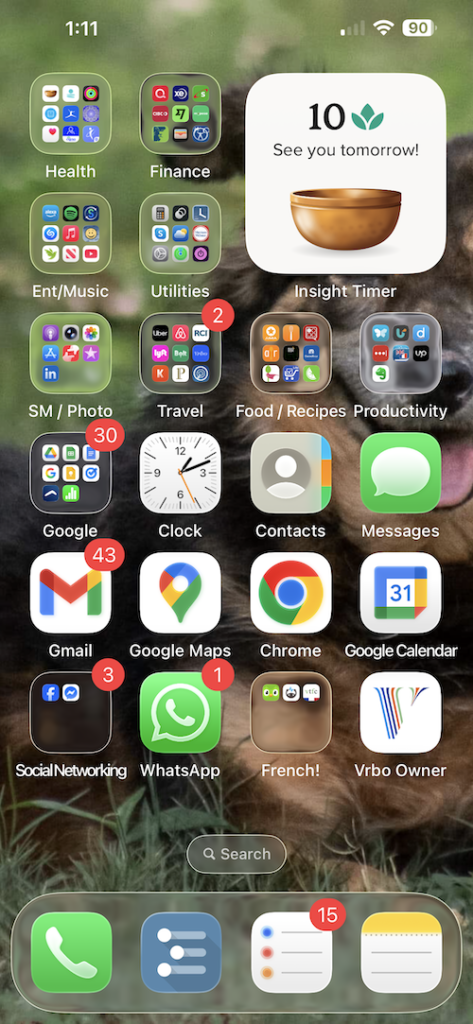
- The gem: I know meditating is good for me, but I can forget to do it. I recently figured out you can easily add a widget to your iPhone screen. In my case, it’s my meditation app that reminds me. Super simple and super effective. It’s literally right in front of my face when I look at my phone.
- How to: do a quick Google or ChatGPT search to see if an app that you’d like reminders for has a widget. Then follow the instructions.
4. PowerPoint
- The gem: Public speaking can be haaaaaard, awkward, and embarrassing. But most of us need to do it, whether it’s in a staff meeting, leading a workshop, or making a pitch. Would you believe me if I told you that you have a free, public speaking coach available to you 24/7? It’s true. It’s a new feature in PowerPoint.
- How to: Open up a presentation, click Slideshow, rehearse with coach, and start rehearsing. Once you finish, you’ll get a report that gives you feedback on all of the following:
- Total time
- Number of slides
- Slides to work on
- Pace
- Pace over time
- Sensitive phrases
- Fillers
- If that’s deserving of a high five, I don’t know what is.
5. Podcasts
- The gem: If there’s something you’re interested in, I can 99.9% guarantee there’s a podcast or three on it. But the very thing that makes podcasts great (audio/listening) can be a pain when you want to share a clip or look up something from the podcast in written form (say an author’s name and how it’s spelled), which can be a pain of a time waster. Imagine my surprise (after wasting time searching for podcast transcriptions online) that I recently realized they’re part of the actual podcast (at least in Apple Podcasts).
- How to: Simply play the podcast and click the little speech bubble on the bottom left. Ét voila! Easy peasy.
Sometimes the sweetest things are right under your nose in the form of a tech tool you’re already using that has unexplored and highly beneficial features.
I’ve given you five examples where I’ve found wonderful extra features.
From multi-language closed captioning on Zoom and Apple Fitness fit for you, to iPhone widgets to help you stay on track, your 24/7 free public speaking coach, and easy-peasy podcast transcriptions, there’s something for everyone.
But not in an overwhelming-gotta-learn-a-whole-new-tool but rather with a simple nudge to uncover a little nugget.
Cheers to you and cheers to amping up your tech.
Now go on and learn, laugh, and lead

Learn
- Speaking of Apple Fitness, check out How To Beat Exhaustion And Overwhelm: A Proven Solution, including how I use my Apple Watch to do just that.
Laugh
- No matter your age, tech overwhelm is a real thing. Just ask this 17-year-old and 80-year-old.
Lead
- Pick your top one or two tech tools and put aside a few minutes to explore one extra feature you can use in each. Then revel in your awesome use of tech.
P.S.
- Have a burning topic of yours that you’d love to share with the world? Check out my Transformative Trainers Academy – for game changers like you who want to learn how to design and deliver world-changing workshops that wow. Join our global online community membership program now. We’re waiting with open arms.
P.P.S.
- Are you a UN staff member wanting to brush up on your public speaking skills in a way that’s actually fun, enjoyable, and leads to a marked difference in your confidence? I’ve got you. I’m giving a two-part workshop on March 24 and 25, 9 am to noon EAT. You can find more information here and email unon-hrlearning (@) un.org to register and get information on cost.
- Not a UN staff, but you’re interested in improving your public speaking skills? Email me (laragan @ rpsinc.ca) – I’ll add you to the list as others have expressed interest as well. We may do a separate workshop.


Leave a Reply