
Did you know that your Zoom recording has a hidden file that makes timestamping easy peasy?
Definition: Timestamping is like a table of contents for your video, giving viewers a clickable map instead of a sea of footage to wade through.
Onwards with the timestamping.
Your recording is only as useful as people’s ability to quickly find what they want. And right now, most recordings get shared as a single link with zero timestamping, which means most participants either skip it entirely or spend ten frustrated minutes trying to find the one part they actually need.
There’s a better way, and it takes about five minutes
BTW, Zoom does generate timestamps automatically. The problem is they’re useless for participants. You get a transcript chopped into hundreds of tiny fragments, and no connection to your actual agenda whatsoever.
Sharing Zoom’s raw transcript with participants would be like handing someone a 47-page document and saying, “Good luck.”

Or like manually scrubbing through 90 minutes of footage like it was 1987 and trying to record a song off the radio.
The solution has been sitting in a VTT file the whole time. Say what?! Stick with me.
A quick explainer: what’s a VTT file?
When you record a Zoom session to the cloud, Zoom quietly generates several files behind the scenes. But most people only notice the MP4 video.
However, alongside it is a VTT file, which stands for Video Text Track. It’s a plain text file containing a complete, timestamped transcript of everything said during your session, broken into small chunks with the exact time each one was spoken.
That’s an example above.
That VTT file is the secret ingredient.
Here we go with the recipe for the magic.
Step 1: Download your VTT file from Zoom
- Log in to your Zoom account and go to Recordings.
- Open the recording you want to timestamp.
- Look for the option to download the Audio Transcript file. This is your VTT file. It will download with a .vtt extension.
Step 2: Open a new Claude (like ChatGPT but better) conversation and upload your meeting agenda
This gives Claude the framework it needs to do the matching. Your agenda can be a simple Word document. It doesn’t need to be formatted in any special way. A plain list of session items, with or without timing notes, works perfectly.
- Go to claude.ai and start a new conversation.
- Click the paperclip or attachment icon and upload your agenda document.
- Once it’s uploaded, tell Claude what it is. You can use something like this prompt:
“This is the agenda for a Zoom session I facilitated. I’m going to upload the transcript file next. I’d like you to match each agenda item to the closest timestamp in the transcript.”
Step 3: Upload the VTT file to Claude
Now upload the VTT file to the same conversation
- Click the attachment icon again.
- Upload your .vtt file.
- Send a prompt along these lines:
“Here is the VTT transcript from the Zoom recording of this session. Please match each agenda item to the timestamp in the transcript where that topic appears to begin. Give me a clean, simplified list with just the agenda item name and its timestamp. I don’t need the full transcript, just the matched timestamps.”
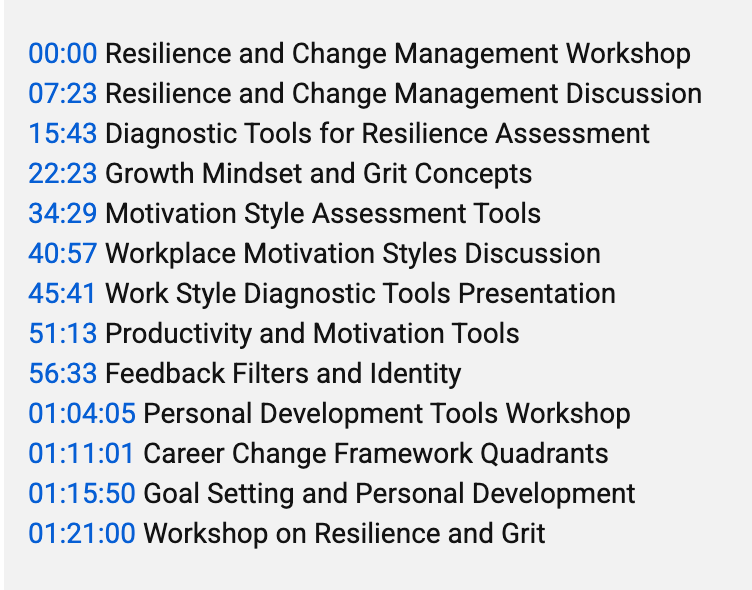
Now Claude will read through the full transcript, identify the moments where each agenda item starts based on what was being said, and give you a condensed list that looks something like this (these are from a recent Learning and Development Roundtable of mine, “From Generic to Genius Leveraging AI to Customize Your Learning.”
00:00 Resilience and Change Management Workshop Introduction
07:23 Resilience and Change Management Discussion
15:43 Diagnostic Tools for Resilience Assessment
22:23 Growth Mindset and Grit Concepts
That’s your timestamped agenda. Done in about five minutes.
Now what?
Step 4: Send it to your participants
Now you have clean, usable timestamps that you can paste directly into a follow-up email or message you send to participants. Instead of sharing a raw recording link and hoping people will watch the whole thing, you can say:
“Here’s the recording from our session. Use the timestamps below to jump directly to the parts most relevant to you.”
It’s a small thing, but it shows respect for people’s time and dramatically increases the chances that participants actually revisit the content.

Pro tip to knock it out of the park: You can also use your timestamps to:
- Add chapter markers to a YouTube or Vimeo upload of the recording. Both platforms support timestamps in the description to create clickable chapters. All you need to do is copy the timestamps into the video description and save. Then YouTube and/or Vimeo will automatically do the magic so that the stamps become URLS.
- If you do the above, you can now copy those hyperlinked timestamps and send them to your participants, and they’ll automatically open up at that point in the video.
Cool right?!
Take the simple ingredients of your agenda + your meeting VTT file + Clause, and you’ll have your timestamps in about the same time that it takes you to say “Wowza, that’s sublime and kinda fun actually.”
Take Action Now – go on and learn, laugh, and lead

Learn
- The next time you record a call, follow these steps for timestamping terrificness.
Laugh
- Speaking of 1987, once you learn this technique, you’re “never gonna give it up.
Lead
- Upload the timestamps in your video description, as outlined in the pro tip, and share the hyperlinks with your participants, then sit back and rest on your well-deserved laurels.
P.S.
- The Learning and Development Roundtable is on a break until September, so not to have you feeling bereft, if you’re a member, you’ll be receiving these weekly tips on how to learn, laugh, and lead until we start up again.
- If this is the first you’re hearing of the Learning and Development Roundtable as a newsletter subscriber, find out more here and join us! It’s free, and as a member, you get access to 13+ years of resources.
P.P.S.
- If this kind of practical AI shortcut is your thing, you’re in the right place. I share tools, tips, and real-world applications regularly inside the Transformative Trainers Academy, a global community for change makers and game changers who’ve been tasked to teach, or who just decided to. No formal training background required. You belong here. Come find us. I’d love to have you.


Leave a Reply